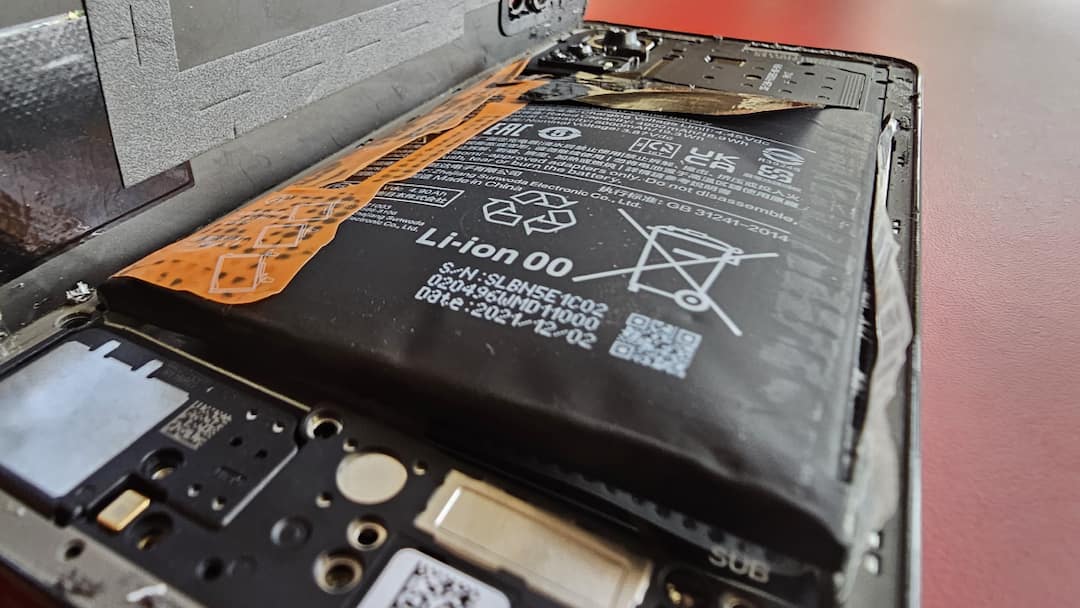
Nowadays, batteries equal to the capacity of a power bank are available in smartphones. 10,000mAh batteries are now going to be common in phones of Chinese companies. Due to the new silicon-carbon battery pack, a higher capacity battery can now be provided without increasing the size of the phone. Despite all these advancements, sometimes problems occur in the battery, due to which the battery swells. In many cases, swelling of the battery can be dangerous. So today we are going to tell you what you should not do if your phone’s battery is swollen.
What not to do when the battery swells?
Do not use the device- If the battery of your smartphone is swollen then stop using it immediately. If the device remains in use even after the battery is full, the risk of the battery catching fire increases. Therefore, immediately stop using the device and focus on battery replacement.
Do not connect to computer or laptop- If the battery is swollen then do not connect the phone to a computer or laptop etc. If you connect it to the system, the battery will start charging through the USB-C wired connection, which can be dangerous.
Do not try to repair yourself- If you are not an expert, never try to repair the battery by yourself. Doing so may prove dangerous. Similarly, do not try to remove the casing of the phone. During this attempt, if any sharp object hits the battery, there is a risk of explosion. Tampering with the phone’s battery or puncturing it to release gas can cause an explosion. Turn off the device with swollen battery and keep it in a safe place. Always seek professional help when removing or replacing the battery.
Read this also-
Great discount is available on iPhone 17 Pro Max, take advantage of the amazing offer from here